

- Deploy services on Kubernetes and connect them to Restate Cloud or BYOC
- Deploy services on Kubernetes and connect them to a self-hosted Restate environment, that can in turn be managed by the operator.
What is the Restate Operator?
The Restate Operator is the recommended way to deploy Restate services on Kubernetes. It manages the Kubernetes workloads for your services and handles registration with Restate and versioning.restatedev/restate-operator
Loading repository data...
The operator extends Kubernetes with resources for running Restate and deploying your service applications:
What does the operator do for you?
For service deployments, the operator:- Deploys your application with ReplicaSets or Knative Serving
- Registers its SDK endpoint with Restate Cloud, BYOC, or a self-hosted Restate environment
- Creates a new service revision when your pod template changes
- Keeps old revisions available until their invocations have drained
- Establishes a secure outbound tunnel when connecting private services to Restate Cloud
Operator 3 introduced Helm-managed CRD upgrades. The first upgrade to version 3 requires a one-time CRD ownership handoff. Follow the operator 3 upgrade instructions before upgrading an existing installation.
Deploy a service to Restate Cloud or BYOC
Restate Cloud must be able to send invocations to your SDK endpoint. For services in a private Kubernetes cluster, you use the Restate Cloud Tunnel to set up a secure connection that does not require exposing a public ingress.To try this end to end, connect a greeter service on a local kind cluster to Restate Cloud by following this guide.
Choose a tunnel mode to connect to Restate Cloud
You can run the tunnel client in your application process or as a standalone deployment:
We recommend the in-process tunnel client for TypeScript and Go because it removes the extra network hop. Use the standalone tunnel client for other SDKs or when you prefer to operate the client independently from your application.
How does the in-process tunnel client work?
How does the in-process tunnel client work?
Each application pod maintains an outbound connection to Restate Cloud. Invocations arrive directly at the SDK handler without a Kubernetes Service or standalone tunnel client pod in the invocation path. The operator injects the environment, region, signing key, and versioned tunnel name through
RESTATE_INPROC_* environment variables.How does the standalone tunnel client work?
How does the standalone tunnel client work?
The 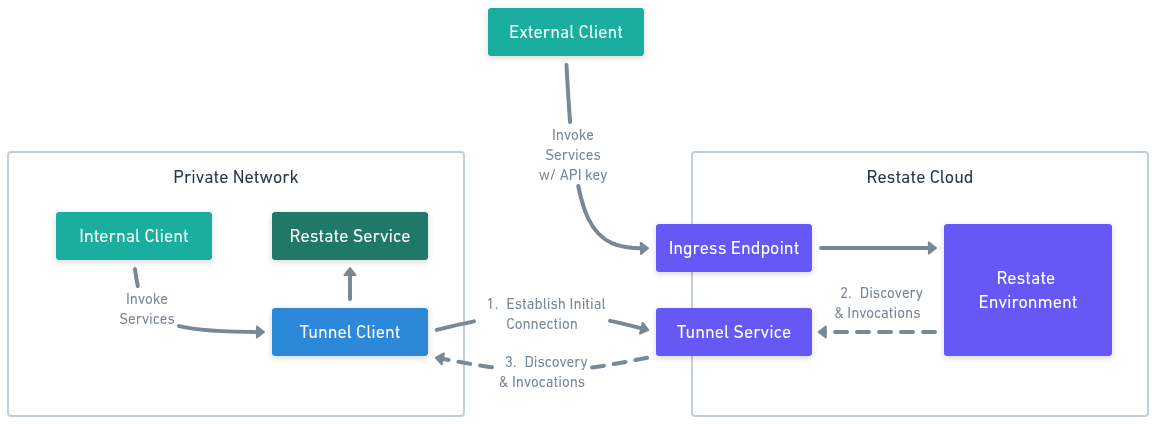
RestateCloudEnvironment runs the tunnel client for you, as a pod in your cluster. It forwards each invocation through a Kubernetes Service to your application pods.The tunnel client opens an outbound connection to Restate Cloud, so your service needs no public ingress and no inbound ports.- Connect. The tunnel client resolves the tunnel servers for your region and dials out to them, authenticating with your API key. It holds one connection per tunnel server and redials on its own if a connection drops.
- Register. Each connection is keyed by your environment and tunnel name. The deployment URL you register encodes both, plus the address the tunnel client should forward to.
- Invoke. Restate Cloud sends discovery and invocation requests for that deployment to the tunnel server, which streams them down one of the connections registered under that tunnel name.
- Forward. The tunnel client forwards each request to your service’s endpoint inside your network, and responses stream back over the same connection.
RestateCloudEnvironment. The tunnel mode is selected for each RestateDeployment, so services using different modes can share the same Cloud environment resource.
Deploy a service and connect to Restate Cloud
Choose the tunnel mode you want to use and follow the corresponding instructions:- In-process Tunnel
- Standalone Tunnel
Use the in-process tunnel client to connect each application pod directly to Restate Cloud without exposing an inbound endpoint. This is the recommended path for TypeScript and Go services.
1
Install the Restate Operator
Install the Restate Operator via Helm:To install the operator, you need permission to create namespaces and CRDs.
2
Create the Restate Cloud Secrets
Create an API key in Restate Cloud at Developers > API Keys > Create API Key. Save the
key_ value in a file named token.The operator needs the key in the restate-operator namespace. The in-process tunnel client needs the same key in your service’s namespace because Kubernetes Secrets are namespace scoped:3
Create a RestateCloudEnvironment
Create the environment manifest:
restate-cloud-environment.yaml
environmentId: copy it from the top left corner of the Restate Cloud UI. It starts withenv_.signingPublicKey: copy it from Developers > Security > HTTP endpoints. It starts withpublickeyv1_.region: use the identifier shown next to your environment ID, such asusoreu. BYOC environments can use a multi-label identifier such as<environment>.byoc.
A
RestateCloudEnvironment deploys a standalone tunnel client pod by default. Services configured with tunnelMode: in-process connect directly from their application pods and do not use that pod in their invocation path.4
Add the in-process tunnel client
Replace the normal SDK listener with the in-process tunnel client:In TypeScript,
connectTunnel(...) replaces restate.serve(...). In Go, tunnel.NewTunnel(srv).Start(...) replaces srv.Start(...).In-process tunnel clients for the other Restate SDKs are coming. Check the SDK release notes for updates.
5
Create the RestateDeployment
Create a The operator injects the remaining
RestateDeployment with tunnelMode: in-process and mount the API key Secret:service-deployment.yaml
RESTATE_INPROC_* configuration, registers the tunnel URL, and handles versioning.6
Invoke your service
Go to the Restate Cloud UI’s Playground and send a request to your service.
Deploy a service to self-hosted Restate
Register your service with a self-hosted Restate environment. This example uses aRestateCluster resource named restate in the same Kubernetes cluster, so no Restate Cloud tunnel or Cloud API key is required.
To deploy a self-hosted Restate cluster with the operator, see Deploy Restate on Kubernetes. To try the complete setup on a local kind cluster, follow the operator guide.
1
Install the Restate Operator
Install the Restate Operator via Helm:To install the operator, you need permission to create namespaces and CRDs.
2
Create the RestateDeployment
Create a Once applied, the Restate Operator registers your service and handles versioning.
RestateDeployment that references your RestateCluster named restate:service-deployment.yaml
Read the
RestateDeployment documentation, or view the full specification as Pkl or YAML.3
Invoke your service
Go to the Restate UI’s Playground and send a request to your service.
Knative Deployment
TheRestateDeployment CRD can use Knative Serving instead of ReplicaSets. The operator then manages the Knative Configurations, Routes, Restate registration, and service versions while Knative provides request-based autoscaling and scale-to-zero.
Install Knative Serving before applying a Knative-mode RestateDeployment:
RestateCluster named restate. To register with Restate Cloud or BYOC, use cloud: my-cloud-environment instead.
The optional knative.tag controls deployment identity:
- Keep the same tag for an in-place update to the existing Restate deployment. Only do this when the change is compatible with invocations already assigned to that deployment.
- Change the tag to create and register a new version while the previous version drains.
- Omit the tag to use the pod template hash and create a new version for every template change.
h2c for HTTP/2 or http1 for HTTP/1.1. In-process Restate Cloud tunnels are not supported in Knative mode.
See the operator’s Knative Serving documentation and complete examples.
To run on Knative without the operator, see the accordion under Direct Kubernetes deployments.
Horizontal scaling and load balancing
Restate allows scaling your services horizontally by running multiple replicas of your pods. To distribute traffic across these pods, you need to set up load balancing in between the Restate server and your service pods. This way, Restate gets a stable endpoint to send requests to, and the load balancer distributes the requests across the available pods.Autoscale operator-managed revisions
In ReplicaSet mode, you can attach your own HorizontalPodAutoscaler to theRestateDeployment scale subresource to scale the latest revision. You can also configure spec.autoscaling so the operator creates an HPA for each older revision while its invocations drain:
scaleTargetRef. CPU and memory metrics require resource requests on your service containers. This setting applies only to draining revisions in ReplicaSet mode. Knative uses its own autoscaler.
In a standard Kubernetes setup, you would typically use a Service of type ClusterIP or LoadBalancer to distribute traffic across your pods.
Kubernetes Services distribute new connections across eligible pods. The exact behavior depends on your cluster’s networking implementation.
If your services are running over HTTP/2 (the default), each Restate partition will generally have only one TCP connection to a single destination pod.
However, because there are many partitions (by default 24, typically more in a larger cluster) this should get your pods a reasonably
even distribution of traffic.
For more advanced load balancing options, you can use an L7 load balancer like Istio or Cilium.
Note that there is no need for routing to be sticky, because each invocation is self-contained and has all the context it needs to execute (the journal and any K/V state).
No context is assumed to be sticky on the node.
However, if you wish to do so, you can do sticky routing via the invocation ID in your request headers (x-restate-invocation-id).
Direct Kubernetes deployments
Use the Restate Operator when you want automatic registration, version management, and operator-managed scaling.
Deployment and Service resources.
A Kubernetes Deployment of more than one replica is generally appropriate,
and a Kubernetes Service is used to provide a stable DNS name and IP for the pods.
Here is an example manifest with a single pod in Kubernetes:
http://<service>.<namespace>:9080.
⚠️ Note that this setup will not account for keeping around old code versions, so updating your code can break in-flight invocations.
Check the versioning documentation for more information.
Knative without the Restate Operator
Knative without the Restate Operator
Restate services also run on a plain Knative Or as a manifest:The service is reachable at
Service, without the operator. There are no special container requirements beyond naming the port h2c:http://<service-name>.<namespace>, but to handle versioning it is preferable to register the revision URL, such as http://<service-name>-0001.<namespace>, as part of your deployment workflow.Knative exposes the service through the Ingress by default. Restate does not require this, so you can pass --cluster-local to the creation command to disable it.Learn more in this blog post and the Go example.