> ## Documentation Index
> Fetch the complete documentation index at: https://restate-6d46e1dc-cloud-docs.mintlify.site/llms.txt
> Use this file to discover all available pages before exploring further.
# Containers and VMs
> Run Restate services in containers or on virtual machines and connect them to your Restate environment.
You can deploy a Restate service in a container or on any virtual machine. The service runs as a separate process using the appropriate language runtime or as a compiled binary. By convention, it accepts HTTP connections on port `9080`.
## Docker
You can run your Restate service in a Docker container.
Most of the Restate service templates come with a `Dockerfile` that you can use to build a Docker image for your service.
## Connecting services with public endpoints
If your service has a public HTTPS endpoint, secure it with request identity validation so that it only accepts requests from the Restate environment you trust.
First, obtain the environment's request identity public key:
Restate Cloud and BYOC environments create and manage the request identity key for you.
Copy the environment's public key from [**Developers > Security > HTTP endpoints**](https://cloud.restate.dev/to/developers/integration#http-endpoints) in the Restate Cloud UI.
Request identity uses an ED25519 key pair. Give the private key to Restate so it can sign requests, and give the public key to your services so they can verify those signatures.
Choose one of the following ways to generate the keys:
1. Generate the private key:
```bash theme={null}
openssl genpkey -algorithm ed25519 -outform pem -out private.pem
```
2. Provide its path to Restate on startup:
```bash theme={null}
export RESTATE_REQUEST_IDENTITY_PRIVATE_KEY_PEM_FILE=private.pem
```
3. Start Restate and copy the corresponding public key from the startup log. Restate prints it in the compact format expected by the SDK:
```log theme={null}
INFO restate_service_client::request_identity::v1
Loaded request identity key
kid: "publickeyv1_w7YHemBctH5Ck2nQRQ47iBBqhNHy4FV7t2Usbye2A6f"
path: private.pem
```
Run this script to generate `private.pem` and write the corresponding `publickeyv1_...` value to a `public-key` file before starting Restate:
Install OpenSSL 3 with Homebrew, then run the script:
```bash theme={null}
brew install openssl@3
```
```shell expandable generate.sh theme={null}
#!/usr/bin/env bash
set -euo pipefail
openssl_bin="$(brew --prefix openssl@3)/bin/openssl"
# generate private key
"$openssl_bin" genpkey -algorithm ed25519 -outform pem -out private.pem
echo "Wrote private key to private.pem"
# encode public key
encoded=$("$openssl_bin" pkey -in private.pem -pubout -outform DER 2>/dev/null |
tail -c +13 |
od -An -v -tu1 |
awk '
BEGIN {
alphabet = "123456789ABCDEFGHJKLMNPQRSTUVWXYZabcdefghijkmnopqrstuvwxyz"
leading = 1
}
{
for (i = 1; i <= NF; i++) {
byte = $i
if (leading && byte == 0) {
zeroes++
continue
}
leading = 0
carry = byte
for (j = 0; j < digit_count; j++) {
carry += digits[j] * 256
digits[j] = carry % 58
carry = int(carry / 58)
}
while (carry > 0) {
digits[digit_count++] = carry % 58
carry = int(carry / 58)
}
}
}
END {
for (i = 0; i < zeroes; i++) printf "1"
for (i = digit_count - 1; i >= 0; i--) {
printf "%s", substr(alphabet, digits[i] + 1, 1)
}
}')
echo -n "publickeyv1_${encoded}" > public-key
echo "Wrote publickeyv1_${encoded} to public-key"
```
This script requires Bash, OpenSSL, `awk`, and GNU Coreutils:
```shell expandable generate.sh theme={null}
#!/usr/bin/env bash
set -euo pipefail
# generate private key
openssl genpkey -algorithm ed25519 -outform pem -out private.pem
echo "Wrote private key to private.pem"
base58_chars="123456789ABCDEFGHJKLMNPQRSTUVWXYZabcdefghijkmnopqrstuvwxyz"
# encode public key
encoded=$(openssl ec -in private.pem -inform pem -pubout -outform der -out /dev/stdout 2>/dev/null |
tail -c +13 |
basenc --base16 "${1:-/dev/stdin}" -w0 |
if
read
[[ $REPLY =~ ^((00)*)(([[:xdigit:]]{2})*) ]]
echo -n "${BASH_REMATCH[1]//00/1}" # leading 0s -> 1
(( ${#BASH_REMATCH[3]} > 0 ))
then
dc -e "16i0${BASH_REMATCH[3]^^} Ai[58~rd0 public-key
echo "Wrote publickeyv1_${encoded} to public-key"
```
Then configure the public key in your SDK endpoint:
```typescript TypeScript {"CODE_LOAD::ts/src/develop/serving.ts#identity"} theme={null}
restate.serve({
services: [myService],
identityKeys: ["publickeyv1_w7YHemBctH5Ck2nQRQ47iBBqhNHy4FV7t2Usbye2A6f"],
});
```
```java Java {"CODE_LOAD::java/src/main/java/develop/ServingIdentity.java#here"} theme={null}
import dev.restate.sdk.auth.signing.RestateRequestIdentityVerifier;
import dev.restate.sdk.endpoint.Endpoint;
import dev.restate.sdk.http.vertx.RestateHttpServer;
class MySecureApp {
public static void main(String[] args) {
var endpoint =
Endpoint.bind(new MyService())
.withRequestIdentityVerifier(
RestateRequestIdentityVerifier.fromKeys(
"publickeyv1_w7YHemBctH5Ck2nQRQ47iBBqhNHy4FV7t2Usbye2A6f"));
RestateHttpServer.listen(endpoint);
}
}
```
```kotlin Kotlin {"CODE_LOAD::kotlin/src/main/kotlin/develop/ServingIdentity.kt#here"} theme={null}
import dev.restate.sdk.auth.signing.RestateRequestIdentityVerifier
import dev.restate.sdk.http.vertx.RestateHttpServer
import dev.restate.sdk.kotlin.endpoint.endpoint
fun main() {
RestateHttpServer.listen(
endpoint {
bind(MyService())
requestIdentityVerifier =
RestateRequestIdentityVerifier.fromKeys(
"publickeyv1_w7YHemBctH5Ck2nQRQ47iBBqhNHy4FV7t2Usbye2A6f",
)
}
)
}
```
```python Python {"CODE_LOAD::python/src/develop/serving.py#identity"} theme={null}
app = restate.app(
services=[my_service],
identity_keys=["publickeyv1_w7YHemBctH5Ck2nQRQ47iBBqhNHy4FV7t2Usbye2A6f"],
)
```
```go Go {"CODE_LOAD::go/develop/serving.go#identity"} theme={null}
if err := server.NewRestate().
Bind(restate.Reflect(MyService{})).
WithIdentityV1("publickeyv1_w7YHemBctH5Ck2nQRQ47iBBqhNHy4FV7t2Usbye2A6f").
Start(context.Background(), ":9080"); err != nil {
log.Fatal(err)
}
```
```rust Rust {"CODE_LOAD::rust/src/develop/serving.rs#identity"} theme={null}
use restate_sdk::endpoint::Endpoint;
use restate_sdk::http_server::HttpServer;
#[tokio::main]
async fn main() {
HttpServer::new(
Endpoint::builder()
.bind(MyService)
.identity_key("publickeyv1_w7YHemBctH5Ck2nQRQ47iBBqhNHy4FV7t2Usbye2A6f")
.unwrap()
.build(),
)
.listen_and_serve("0.0.0.0:9080".parse().unwrap())
.await;
}
```
The public key is not secret, so it is safe to include it directly in your service source code or configuration files.
Then register the public URL:
```bash theme={null}
restate deployments register
```
## Connecting private services to Restate Cloud or BYOC
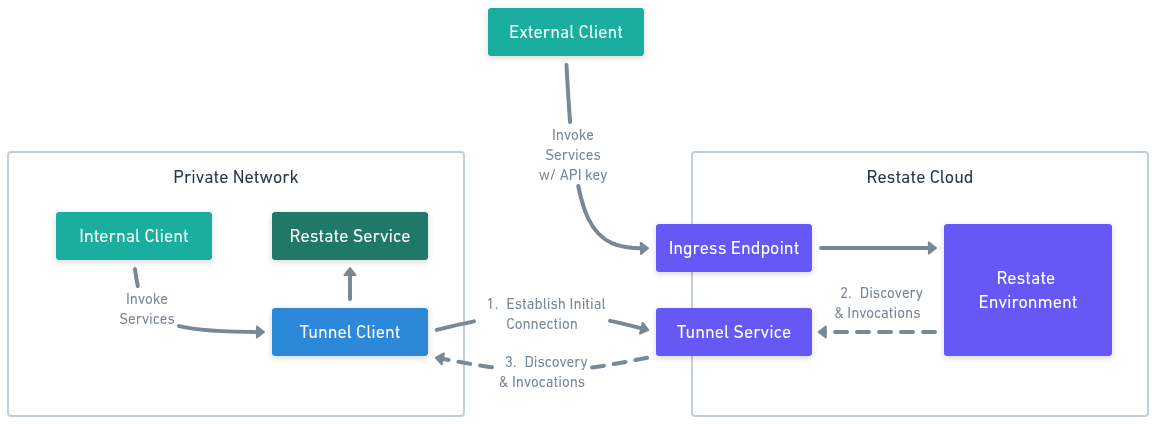
Restate Cloud must be able to send discovery and invocation requests to your service. For a service in a private network, a tunnel establishes an outbound connection to Restate Cloud, so you do not need to expose an inbound endpoint.
The tunnel also acts as an authenticating proxy, making it appear as if your Restate Cloud environment sits inside your private network. That means you can use native access control mechanisms, such as VPC security groups and Kubernetes network policies, to manage access to your Cloud environment. It also lets you control connections from the Cloud environment into the rest of your network, by restricting which internal services the tunnel client is allowed to reach.
Choose how you want to run the tunnel client:
| | In-process Tunnel | Standalone Tunnel |
| ---------------- | ----------------------------------------------------- | ------------------------------------------------------------ |
| Request path | Directly from your service process to Restate Cloud | Through a standalone tunnel client container to your service |
| Application code | Use the tunnel SDK instead of the normal SDK listener | Keep the normal SDK HTTP listener |
| SDK support | TypeScript and Go | All SDKs |
| Operations | Runs and scales with your service | Can be deployed and scaled independently |
We recommend the in-process tunnel client for TypeScript and Go because it removes the extra network hop. Use the standalone tunnel client for another SDK or when you prefer to operate the client independently.
Each service process maintains its own outbound connection to Restate Cloud. Invocations arrive directly at the SDK handler, without a standalone tunnel client or HTTP listener in the invocation path. Replicas of the same deployment use the same tunnel name, which lets Restate Cloud balance requests across their connections.
You run the tunnel client yourself, beside your service or elsewhere in the same private network, and it forwards invocations to your service over its normal HTTP endpoint.
The tunnel client opens an **outbound** connection to Restate Cloud, so your service needs no public ingress and no inbound ports.
1. **Connect.** The tunnel client resolves the tunnel servers for your region and dials out to them, authenticating with your API key. It holds one connection per tunnel server and redials on its own if a connection drops.
2. **Register.** Each connection is keyed by your environment and tunnel name. The deployment URL you register encodes both, plus the address the tunnel client should forward to.
3. **Invoke.** Restate Cloud sends discovery and invocation requests for that deployment to the tunnel server, which streams them down one of the connections registered under that tunnel name.
4. **Forward.** The tunnel client forwards each request to your service's endpoint inside your network, and responses stream back over the same connection.
Requests are signed with your environment's request identity key, so your service only accepts requests that genuinely came from your environment.
Run several tunnel clients with the same tunnel name for redundancy. The tunnel server load balances invocations across every connection registered under that name, so a client going away does not take the deployment offline.
 Use the in-process tunnel client to connect your TypeScript or Go service directly to Restate Cloud.
Develop your service with your preferred Restate SDK. If you are starting a new service, follow the [quickstart](/quickstart).
In the Restate Cloud UI:
1. Open [**Developers > API Keys**](https://cloud.restate.dev/to/developers/integration?createApiKey=true\&createApiKeyDescription=tunnel-key\&createApiKeyRole=rst:role::FullAccess) and create an API key with the **Full** role.
2. Open [**Developers > Security > HTTP endpoints**](https://cloud.restate.dev/to/developers/integration#http-endpoints) and copy the signing public key.
3. Copy the environment ID and region identifier shown in the UI.
Set the values as environment variables where you will run the service:
```bash theme={null}
export RESTATE_ENVIRONMENT_ID=env_...
export RESTATE_AUTH_TOKEN=key_...
export RESTATE_TUNNEL_NAME=greeter-v1
export RESTATE_SIGNING_PUBLIC_KEY=publickeyv1_...
export RESTATE_CLOUD_REGION=eu
```
Give each distinct deployment its own DNS friendly tunnel name. Replicas of the same deployment should share the same name. For a Restate managed region, use a value such as `eu` or `us`. For BYOC, use the region identifier shown in the UI.
Install the tunnel package for your SDK:
```bash TypeScript theme={null}
npm install @restatedev/restate-sdk-tunnel
```
```bash Go theme={null}
go get github.com/restatedev/sdk-go/x/tunnel
```
Replace the normal SDK listener with the tunnel client:
```typescript TypeScript {"CODE_LOAD::ts/src/develop/tunnel.ts#in_process_tunnel"} theme={null}
import { connectTunnel } from "@restatedev/restate-sdk-tunnel";
import { greeter } from "./greeter";
const connection = connectTunnel({
region: process.env.RESTATE_CLOUD_REGION!,
environmentId: process.env.RESTATE_ENVIRONMENT_ID!,
authToken: process.env.RESTATE_AUTH_TOKEN!,
signingPublicKey: process.env.RESTATE_SIGNING_PUBLIC_KEY!,
tunnelName: process.env.RESTATE_TUNNEL_NAME!,
services: [greeter],
});
connection.ready.then(() => {
console.log(`Register this deployment: ${connection.deploymentUrl}`);
});
```
```go Go {"CODE_LOAD::go/develop/tunnel.go#in_process_tunnel"} theme={null}
package develop
import (
"context"
"log"
"os"
restate "github.com/restatedev/sdk-go"
"github.com/restatedev/sdk-go/server"
"github.com/restatedev/sdk-go/x/tunnel"
)
func serveWithTunnel() {
srv := server.NewRestate().Bind(restate.Reflect(MyService{}))
err := tunnel.NewTunnel(srv,
tunnel.WithRegion(os.Getenv("RESTATE_CLOUD_REGION")),
tunnel.WithEnvironment(
os.Getenv("RESTATE_ENVIRONMENT_ID"),
os.Getenv("RESTATE_SIGNING_PUBLIC_KEY"),
),
tunnel.WithAuthToken(os.Getenv("RESTATE_AUTH_TOKEN")),
tunnel.WithTunnelName(os.Getenv("RESTATE_TUNNEL_NAME")),
).Start(context.Background())
if err != nil {
log.Fatal(err)
}
}
```
The TypeScript client exposes the deployment URL through `connection.deploymentUrl`. The Go client logs it after connecting.
Request identity validation ensures that your service only accepts requests signed by the Restate Cloud or BYOC environment you trust.
The tunnel SDK validates request identity with the signing public key. The public key is not secret, so it is safe to include it directly in your service source code or configuration files.
In-process tunnel clients are currently available for TypeScript and Go. Support for the other Restate SDKs is coming.
Copy the deployment URL printed when the tunnel connects and register it:
```bash theme={null}
restate deployments register
```
Use the standalone tunnel client with any Restate SDK. It runs as a Docker container and forwards requests to your service's HTTP endpoint.
Develop your service with your preferred Restate SDK. If you are starting a new service, follow the [quickstart](/quickstart).
By default, the service listens on port `9080`. Make sure the tunnel container can reach it. You do not need to expose this endpoint to the public internet.
Request identity validation ensures that your service only accepts requests signed by the Restate Cloud or BYOC environment you trust.
Configure the environment's signing public key in your SDK endpoint:
```typescript TypeScript {"CODE_LOAD::ts/src/develop/serving.ts#identity"} theme={null}
restate.serve({
services: [myService],
identityKeys: ["publickeyv1_w7YHemBctH5Ck2nQRQ47iBBqhNHy4FV7t2Usbye2A6f"],
});
```
```java Java {"CODE_LOAD::java/src/main/java/develop/ServingIdentity.java#here"} theme={null}
import dev.restate.sdk.auth.signing.RestateRequestIdentityVerifier;
import dev.restate.sdk.endpoint.Endpoint;
import dev.restate.sdk.http.vertx.RestateHttpServer;
class MySecureApp {
public static void main(String[] args) {
var endpoint =
Endpoint.bind(new MyService())
.withRequestIdentityVerifier(
RestateRequestIdentityVerifier.fromKeys(
"publickeyv1_w7YHemBctH5Ck2nQRQ47iBBqhNHy4FV7t2Usbye2A6f"));
RestateHttpServer.listen(endpoint);
}
}
```
```kotlin Kotlin {"CODE_LOAD::kotlin/src/main/kotlin/develop/ServingIdentity.kt#here"} theme={null}
import dev.restate.sdk.auth.signing.RestateRequestIdentityVerifier
import dev.restate.sdk.http.vertx.RestateHttpServer
import dev.restate.sdk.kotlin.endpoint.endpoint
fun main() {
RestateHttpServer.listen(
endpoint {
bind(MyService())
requestIdentityVerifier =
RestateRequestIdentityVerifier.fromKeys(
"publickeyv1_w7YHemBctH5Ck2nQRQ47iBBqhNHy4FV7t2Usbye2A6f",
)
}
)
}
```
```python Python {"CODE_LOAD::python/src/develop/serving.py#identity"} theme={null}
app = restate.app(
services=[my_service],
identity_keys=["publickeyv1_w7YHemBctH5Ck2nQRQ47iBBqhNHy4FV7t2Usbye2A6f"],
)
```
```go Go {"CODE_LOAD::go/develop/serving.go#identity"} theme={null}
if err := server.NewRestate().
Bind(restate.Reflect(MyService{})).
WithIdentityV1("publickeyv1_w7YHemBctH5Ck2nQRQ47iBBqhNHy4FV7t2Usbye2A6f").
Start(context.Background(), ":9080"); err != nil {
log.Fatal(err)
}
```
```rust Rust {"CODE_LOAD::rust/src/develop/serving.rs#identity"} theme={null}
use restate_sdk::endpoint::Endpoint;
use restate_sdk::http_server::HttpServer;
#[tokio::main]
async fn main() {
HttpServer::new(
Endpoint::builder()
.bind(MyService)
.identity_key("publickeyv1_w7YHemBctH5Ck2nQRQ47iBBqhNHy4FV7t2Usbye2A6f")
.unwrap()
.build(),
)
.listen_and_serve("0.0.0.0:9080".parse().unwrap())
.await;
}
```
The public key is not secret, so it is safe to include it directly in your service source code or configuration files.
Run the standalone tunnel client as a Docker container:
```bash theme={null}
docker run \
-e RESTATE_ENVIRONMENT_ID=env_... \
-e RESTATE_AUTH_TOKEN=key_... \
-e RESTATE_TUNNEL_NAME=greeter-v1 \
-e RESTATE_SIGNING_PUBLIC_KEY=publickeyv1_... \
-e RESTATE_CLOUD_REGION=eu \
-p 8080:8080 \
-p 9090:9090 \
-p 9070:9070 \
-it ghcr.io/restatedev/restate-cloud-tunnel-client:latest
```
Configure the environment variables as follows:
* `RESTATE_ENVIRONMENT_ID`: Copy the environment ID shown in the Restate Cloud UI. It starts with `env_`.
* `RESTATE_AUTH_TOKEN`: Create an API key with the **Full** role under [**Developers > API Keys**](https://cloud.restate.dev/to/developers/integration?createApiKey=true\&createApiKeyDescription=tunnel-key\&createApiKeyRole=rst:role::FullAccess). It starts with `key_`.
* `RESTATE_TUNNEL_NAME`: Choose a DNS friendly name for this deployment. Replicas of the same deployment should share the same name.
* `RESTATE_SIGNING_PUBLIC_KEY`: Copy the signing public key from [**Developers > Security > HTTP endpoints**](https://cloud.restate.dev/to/developers/integration#http-endpoints). It starts with `publickeyv1_`.
* `RESTATE_CLOUD_REGION`: Use the region identifier shown in the UI, such as `eu` or `us`. For BYOC, use the BYOC region identifier.
The health check is available at `:9090/health`. The tunnel container must be able to reach your service's HTTP endpoint.
You can run the `latest` image tag or pin a specific version of the tunnel client, such as `0.4.0`.
By default, the tunnel client exposes the Restate ingress on port `8080` and the Admin API on port `9070` through authenticating proxies. Restrict access to these ports because anyone who can reach them has the same access as the configured token.
Set `RESTATE_REMOTE_PROXY=false` if you do not need these local proxies. You can then omit ports `8080` and `9070` from the Docker command.
Register the service address as it is reachable from the tunnel container:
```bash theme={null}
restate deployments register \
--tunnel-name \
```
The tunnel client forwards discovery and invocation requests from Restate Cloud to this address.
## Running services behind a load balancer
To spread load across multiple instances of services and higher availability, we recommend using a load balancer. The Restate server does not currently support multiple endpoints for a single deployment.
When running an L7 load balancer such AWS Application Load Balancer, be sure to configure it to support HTTP/2 as this enables Restate to use the more efficient bi-directional service invocation protocol.
When using `nginx` as the load balancer, you must use the `grpc_pass` directive instead of `proxy_pass` to forward requests to your services. The `proxy_pass` directive only speaks HTTP/1.1 to the upstream, which downgrades the connection and prevents Restate from using the bidirectional protocol. The `grpc_pass` directive keeps HTTP/2 end-to-end. You also need `http2 on;` on the listener so that nginx accepts HTTP/2 from Restate.
```nginx Expandable nginx.conf theme={null}
events {}
http {
server {
# Plain HTTP + h2c (HTTP/1.1 and HTTP/2 prior knowledge)
# In production, either remove this plain HTTP listener or redirect it
# to HTTPS (note: HTTP/2 prior-knowledge clients won't follow redirects).
listen 80;
http2 on;
server_name _;
client_max_body_size 0;
location / {
grpc_pass grpc://app:9080;
grpc_set_header Host $host;
grpc_set_header X-Real-IP $remote_addr;
grpc_set_header X-Forwarded-For $proxy_add_x_forwarded_for;
grpc_set_header X-Forwarded-Proto $scheme;
}
}
server {
# HTTPS + HTTP/2 (HTTP/1.1 and HTTP/2 via ALPN)
listen 443 ssl;
http2 on;
server_name _;
ssl_certificate /etc/nginx/certs/server.crt;
ssl_certificate_key /etc/nginx/certs/server.key;
ssl_protocols TLSv1.2 TLSv1.3;
ssl_ciphers HIGH:!aNULL:!MD5;
client_max_body_size 0;
location / {
grpc_pass grpc://app:9080;
grpc_set_header Host $host;
grpc_set_header X-Real-IP $remote_addr;
grpc_set_header X-Forwarded-For $proxy_add_x_forwarded_for;
grpc_set_header X-Forwarded-Proto $scheme;
}
}
}
```
Use the in-process tunnel client to connect your TypeScript or Go service directly to Restate Cloud.
Develop your service with your preferred Restate SDK. If you are starting a new service, follow the [quickstart](/quickstart).
In the Restate Cloud UI:
1. Open [**Developers > API Keys**](https://cloud.restate.dev/to/developers/integration?createApiKey=true\&createApiKeyDescription=tunnel-key\&createApiKeyRole=rst:role::FullAccess) and create an API key with the **Full** role.
2. Open [**Developers > Security > HTTP endpoints**](https://cloud.restate.dev/to/developers/integration#http-endpoints) and copy the signing public key.
3. Copy the environment ID and region identifier shown in the UI.
Set the values as environment variables where you will run the service:
```bash theme={null}
export RESTATE_ENVIRONMENT_ID=env_...
export RESTATE_AUTH_TOKEN=key_...
export RESTATE_TUNNEL_NAME=greeter-v1
export RESTATE_SIGNING_PUBLIC_KEY=publickeyv1_...
export RESTATE_CLOUD_REGION=eu
```
Give each distinct deployment its own DNS friendly tunnel name. Replicas of the same deployment should share the same name. For a Restate managed region, use a value such as `eu` or `us`. For BYOC, use the region identifier shown in the UI.
Install the tunnel package for your SDK:
```bash TypeScript theme={null}
npm install @restatedev/restate-sdk-tunnel
```
```bash Go theme={null}
go get github.com/restatedev/sdk-go/x/tunnel
```
Replace the normal SDK listener with the tunnel client:
```typescript TypeScript {"CODE_LOAD::ts/src/develop/tunnel.ts#in_process_tunnel"} theme={null}
import { connectTunnel } from "@restatedev/restate-sdk-tunnel";
import { greeter } from "./greeter";
const connection = connectTunnel({
region: process.env.RESTATE_CLOUD_REGION!,
environmentId: process.env.RESTATE_ENVIRONMENT_ID!,
authToken: process.env.RESTATE_AUTH_TOKEN!,
signingPublicKey: process.env.RESTATE_SIGNING_PUBLIC_KEY!,
tunnelName: process.env.RESTATE_TUNNEL_NAME!,
services: [greeter],
});
connection.ready.then(() => {
console.log(`Register this deployment: ${connection.deploymentUrl}`);
});
```
```go Go {"CODE_LOAD::go/develop/tunnel.go#in_process_tunnel"} theme={null}
package develop
import (
"context"
"log"
"os"
restate "github.com/restatedev/sdk-go"
"github.com/restatedev/sdk-go/server"
"github.com/restatedev/sdk-go/x/tunnel"
)
func serveWithTunnel() {
srv := server.NewRestate().Bind(restate.Reflect(MyService{}))
err := tunnel.NewTunnel(srv,
tunnel.WithRegion(os.Getenv("RESTATE_CLOUD_REGION")),
tunnel.WithEnvironment(
os.Getenv("RESTATE_ENVIRONMENT_ID"),
os.Getenv("RESTATE_SIGNING_PUBLIC_KEY"),
),
tunnel.WithAuthToken(os.Getenv("RESTATE_AUTH_TOKEN")),
tunnel.WithTunnelName(os.Getenv("RESTATE_TUNNEL_NAME")),
).Start(context.Background())
if err != nil {
log.Fatal(err)
}
}
```
The TypeScript client exposes the deployment URL through `connection.deploymentUrl`. The Go client logs it after connecting.
Request identity validation ensures that your service only accepts requests signed by the Restate Cloud or BYOC environment you trust.
The tunnel SDK validates request identity with the signing public key. The public key is not secret, so it is safe to include it directly in your service source code or configuration files.
In-process tunnel clients are currently available for TypeScript and Go. Support for the other Restate SDKs is coming.
Copy the deployment URL printed when the tunnel connects and register it:
```bash theme={null}
restate deployments register
```
Use the standalone tunnel client with any Restate SDK. It runs as a Docker container and forwards requests to your service's HTTP endpoint.
Develop your service with your preferred Restate SDK. If you are starting a new service, follow the [quickstart](/quickstart).
By default, the service listens on port `9080`. Make sure the tunnel container can reach it. You do not need to expose this endpoint to the public internet.
Request identity validation ensures that your service only accepts requests signed by the Restate Cloud or BYOC environment you trust.
Configure the environment's signing public key in your SDK endpoint:
```typescript TypeScript {"CODE_LOAD::ts/src/develop/serving.ts#identity"} theme={null}
restate.serve({
services: [myService],
identityKeys: ["publickeyv1_w7YHemBctH5Ck2nQRQ47iBBqhNHy4FV7t2Usbye2A6f"],
});
```
```java Java {"CODE_LOAD::java/src/main/java/develop/ServingIdentity.java#here"} theme={null}
import dev.restate.sdk.auth.signing.RestateRequestIdentityVerifier;
import dev.restate.sdk.endpoint.Endpoint;
import dev.restate.sdk.http.vertx.RestateHttpServer;
class MySecureApp {
public static void main(String[] args) {
var endpoint =
Endpoint.bind(new MyService())
.withRequestIdentityVerifier(
RestateRequestIdentityVerifier.fromKeys(
"publickeyv1_w7YHemBctH5Ck2nQRQ47iBBqhNHy4FV7t2Usbye2A6f"));
RestateHttpServer.listen(endpoint);
}
}
```
```kotlin Kotlin {"CODE_LOAD::kotlin/src/main/kotlin/develop/ServingIdentity.kt#here"} theme={null}
import dev.restate.sdk.auth.signing.RestateRequestIdentityVerifier
import dev.restate.sdk.http.vertx.RestateHttpServer
import dev.restate.sdk.kotlin.endpoint.endpoint
fun main() {
RestateHttpServer.listen(
endpoint {
bind(MyService())
requestIdentityVerifier =
RestateRequestIdentityVerifier.fromKeys(
"publickeyv1_w7YHemBctH5Ck2nQRQ47iBBqhNHy4FV7t2Usbye2A6f",
)
}
)
}
```
```python Python {"CODE_LOAD::python/src/develop/serving.py#identity"} theme={null}
app = restate.app(
services=[my_service],
identity_keys=["publickeyv1_w7YHemBctH5Ck2nQRQ47iBBqhNHy4FV7t2Usbye2A6f"],
)
```
```go Go {"CODE_LOAD::go/develop/serving.go#identity"} theme={null}
if err := server.NewRestate().
Bind(restate.Reflect(MyService{})).
WithIdentityV1("publickeyv1_w7YHemBctH5Ck2nQRQ47iBBqhNHy4FV7t2Usbye2A6f").
Start(context.Background(), ":9080"); err != nil {
log.Fatal(err)
}
```
```rust Rust {"CODE_LOAD::rust/src/develop/serving.rs#identity"} theme={null}
use restate_sdk::endpoint::Endpoint;
use restate_sdk::http_server::HttpServer;
#[tokio::main]
async fn main() {
HttpServer::new(
Endpoint::builder()
.bind(MyService)
.identity_key("publickeyv1_w7YHemBctH5Ck2nQRQ47iBBqhNHy4FV7t2Usbye2A6f")
.unwrap()
.build(),
)
.listen_and_serve("0.0.0.0:9080".parse().unwrap())
.await;
}
```
The public key is not secret, so it is safe to include it directly in your service source code or configuration files.
Run the standalone tunnel client as a Docker container:
```bash theme={null}
docker run \
-e RESTATE_ENVIRONMENT_ID=env_... \
-e RESTATE_AUTH_TOKEN=key_... \
-e RESTATE_TUNNEL_NAME=greeter-v1 \
-e RESTATE_SIGNING_PUBLIC_KEY=publickeyv1_... \
-e RESTATE_CLOUD_REGION=eu \
-p 8080:8080 \
-p 9090:9090 \
-p 9070:9070 \
-it ghcr.io/restatedev/restate-cloud-tunnel-client:latest
```
Configure the environment variables as follows:
* `RESTATE_ENVIRONMENT_ID`: Copy the environment ID shown in the Restate Cloud UI. It starts with `env_`.
* `RESTATE_AUTH_TOKEN`: Create an API key with the **Full** role under [**Developers > API Keys**](https://cloud.restate.dev/to/developers/integration?createApiKey=true\&createApiKeyDescription=tunnel-key\&createApiKeyRole=rst:role::FullAccess). It starts with `key_`.
* `RESTATE_TUNNEL_NAME`: Choose a DNS friendly name for this deployment. Replicas of the same deployment should share the same name.
* `RESTATE_SIGNING_PUBLIC_KEY`: Copy the signing public key from [**Developers > Security > HTTP endpoints**](https://cloud.restate.dev/to/developers/integration#http-endpoints). It starts with `publickeyv1_`.
* `RESTATE_CLOUD_REGION`: Use the region identifier shown in the UI, such as `eu` or `us`. For BYOC, use the BYOC region identifier.
The health check is available at `:9090/health`. The tunnel container must be able to reach your service's HTTP endpoint.
You can run the `latest` image tag or pin a specific version of the tunnel client, such as `0.4.0`.
By default, the tunnel client exposes the Restate ingress on port `8080` and the Admin API on port `9070` through authenticating proxies. Restrict access to these ports because anyone who can reach them has the same access as the configured token.
Set `RESTATE_REMOTE_PROXY=false` if you do not need these local proxies. You can then omit ports `8080` and `9070` from the Docker command.
Register the service address as it is reachable from the tunnel container:
```bash theme={null}
restate deployments register \
--tunnel-name \
```
The tunnel client forwards discovery and invocation requests from Restate Cloud to this address.
## Running services behind a load balancer
To spread load across multiple instances of services and higher availability, we recommend using a load balancer. The Restate server does not currently support multiple endpoints for a single deployment.
When running an L7 load balancer such AWS Application Load Balancer, be sure to configure it to support HTTP/2 as this enables Restate to use the more efficient bi-directional service invocation protocol.
When using `nginx` as the load balancer, you must use the `grpc_pass` directive instead of `proxy_pass` to forward requests to your services. The `proxy_pass` directive only speaks HTTP/1.1 to the upstream, which downgrades the connection and prevents Restate from using the bidirectional protocol. The `grpc_pass` directive keeps HTTP/2 end-to-end. You also need `http2 on;` on the listener so that nginx accepts HTTP/2 from Restate.
```nginx Expandable nginx.conf theme={null}
events {}
http {
server {
# Plain HTTP + h2c (HTTP/1.1 and HTTP/2 prior knowledge)
# In production, either remove this plain HTTP listener or redirect it
# to HTTPS (note: HTTP/2 prior-knowledge clients won't follow redirects).
listen 80;
http2 on;
server_name _;
client_max_body_size 0;
location / {
grpc_pass grpc://app:9080;
grpc_set_header Host $host;
grpc_set_header X-Real-IP $remote_addr;
grpc_set_header X-Forwarded-For $proxy_add_x_forwarded_for;
grpc_set_header X-Forwarded-Proto $scheme;
}
}
server {
# HTTPS + HTTP/2 (HTTP/1.1 and HTTP/2 via ALPN)
listen 443 ssl;
http2 on;
server_name _;
ssl_certificate /etc/nginx/certs/server.crt;
ssl_certificate_key /etc/nginx/certs/server.key;
ssl_protocols TLSv1.2 TLSv1.3;
ssl_ciphers HIGH:!aNULL:!MD5;
client_max_body_size 0;
location / {
grpc_pass grpc://app:9080;
grpc_set_header Host $host;
grpc_set_header X-Real-IP $remote_addr;
grpc_set_header X-Forwarded-For $proxy_add_x_forwarded_for;
grpc_set_header X-Forwarded-Proto $scheme;
}
}
}
```